

 Even though I think SiteGround sucks and is ridiculously overpriced shared hosting with fake reviews, I’ll help you speed up your site on their hosting by improving LCP, TTFB, and web vitals.
First off, you’ll want to use a separate optimization plugin since SiteGround Optimizer does a poor job with core web vitals (I recommend FlyingPress). You’ll still use SiteGround Optimizer for Memcached and a few other features, but not much else. Next, you’ll want to use Cloudflare APO or FlyingProxy which are faster, cheaper, and more reliable compared to SiteGround’s CDN.
These 2 things alone should make a huge improvement to core web vitals. SiteGround will probably tell you their plugin + CDN are better, but they’re only telling you this because it’s their product. This is one of the reasons I don’t like them since they lie more than any host I’ve used.
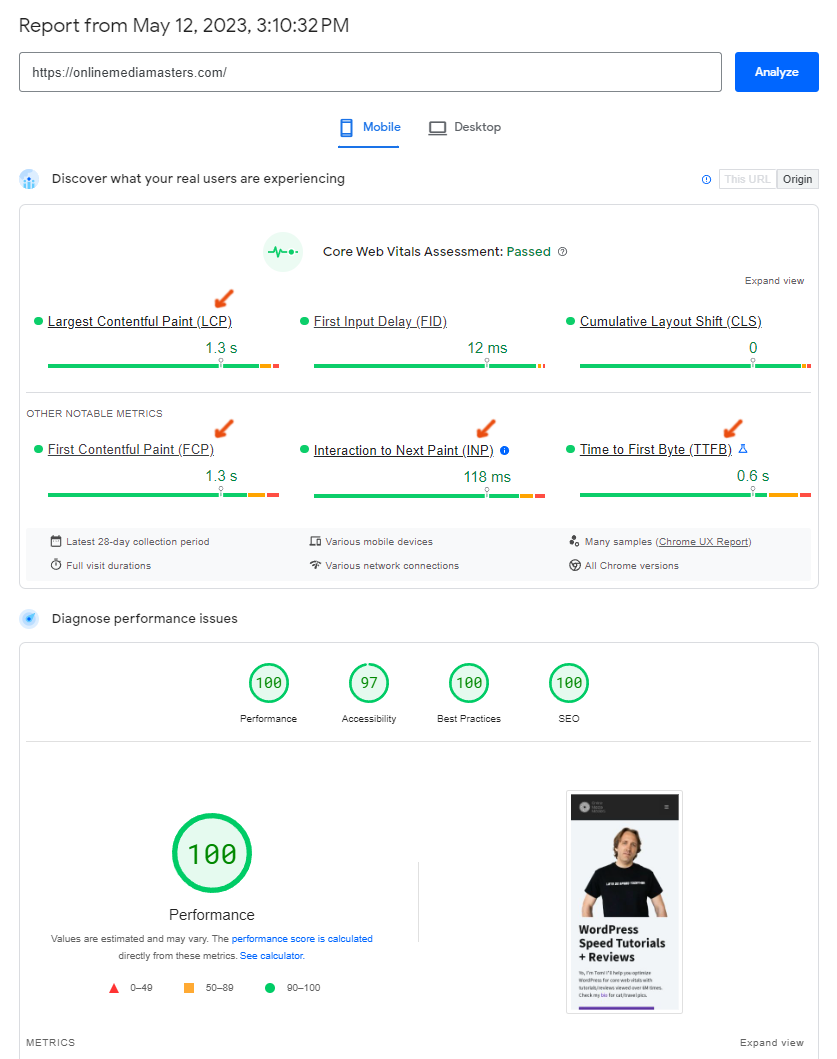
I’ll cover a few other ways to speed up your slow SiteGround website while also reducing CPU usage. I recommend using GTmetrix as your main testing tool, then KeyCDN’s Performance Test or SpeedVitals for testing TTFB in 10-40 locations. For reference, my TTFB is ~100ms globally, I pass web vitals, and here’s my GTmetrix report. Just saying this because – this guide will work!
Even though I think SiteGround sucks and is ridiculously overpriced shared hosting with fake reviews, I’ll help you speed up your site on their hosting by improving LCP, TTFB, and web vitals.
First off, you’ll want to use a separate optimization plugin since SiteGround Optimizer does a poor job with core web vitals (I recommend FlyingPress). You’ll still use SiteGround Optimizer for Memcached and a few other features, but not much else. Next, you’ll want to use Cloudflare APO or FlyingProxy which are faster, cheaper, and more reliable compared to SiteGround’s CDN.
These 2 things alone should make a huge improvement to core web vitals. SiteGround will probably tell you their plugin + CDN are better, but they’re only telling you this because it’s their product. This is one of the reasons I don’t like them since they lie more than any host I’ve used.
I’ll cover a few other ways to speed up your slow SiteGround website while also reducing CPU usage. I recommend using GTmetrix as your main testing tool, then KeyCDN’s Performance Test or SpeedVitals for testing TTFB in 10-40 locations. For reference, my TTFB is ~100ms globally, I pass web vitals, and here’s my GTmetrix report. Just saying this because – this guide will work!
- Configure FlyingPress
- Configure SiteGround Optimizer
- Setup Cloudflare’s APO
- Use Cloudflare’s DNS
- Resize images for mobile
- Disable plugins on specific pages/posts
- Remove old plugin tables with WP-Optimize
- Configure SiteGround Security
- Choose the closest SiteGround data center
- Optimize your page builder
- Upgrade to PHP 8+
- Replace wp-cron with a real cron job
- Don’t upgrade to SiteGround’s cloud hosting
- Stop using SiteGround
- Use faster LiteSpeed/cloud hosting
1. Configure FlyingPress
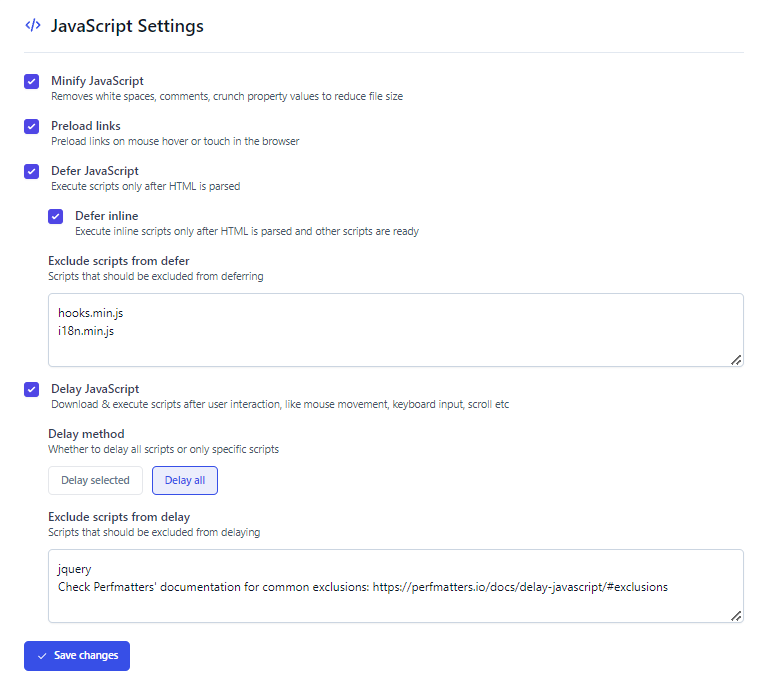
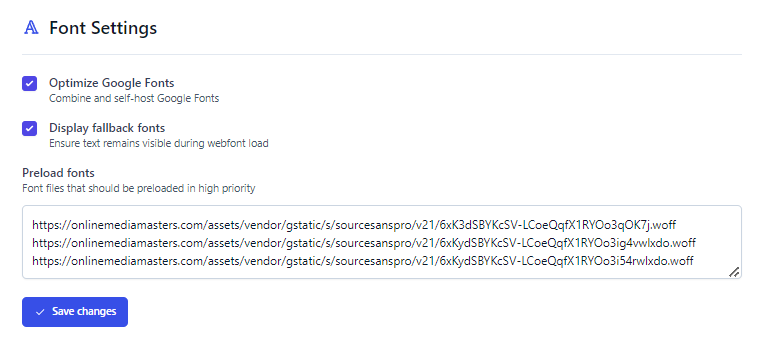
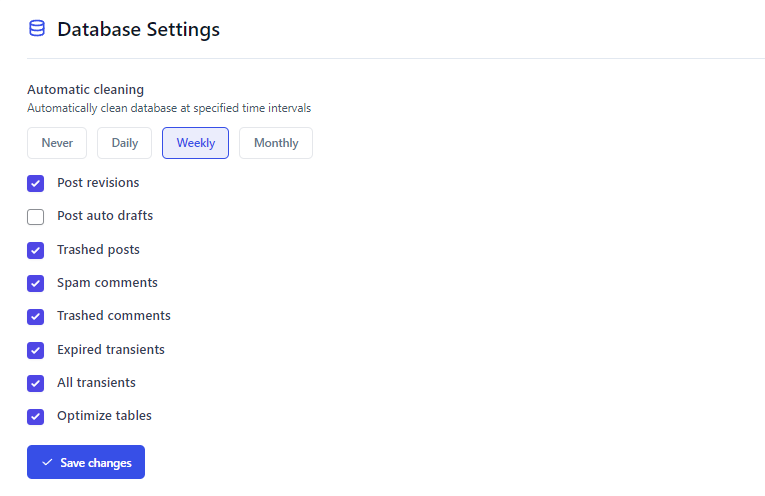
This is why you should use FlyingPress. I was previously using WP Rocket and can confirm FlyingPress is definitely faster while doing a better job optimizing core web vitals. You could use Perfmatters, but it doesn’t support critical CSS and a few other key features. The main benefit of Perfmatters is it has a script manager for disabling plugins on pages/posts they’re not used, but you can do this in Asset CleanUp (free). Either way, you’ll want to use one of these optimization plugins on top of SiteGround Optimizer. When configuring FlyingPress with SiteGround Optimizer, the main thing is to avoid enabling duplicate settings in both plugins. I found the easiest way to do this is to configure FlyingPress normally, then only enable specific settings in SiteGround Optimizer (which I listed in step #2). You’ll want to read my full FlyingPress tutorial, but I showed some of the most important screenshots below. I also have a tutorial on the Perfmatters settings and WP Rocket settings.You may want to disable SiteGround Optimizer while configuring these settings.
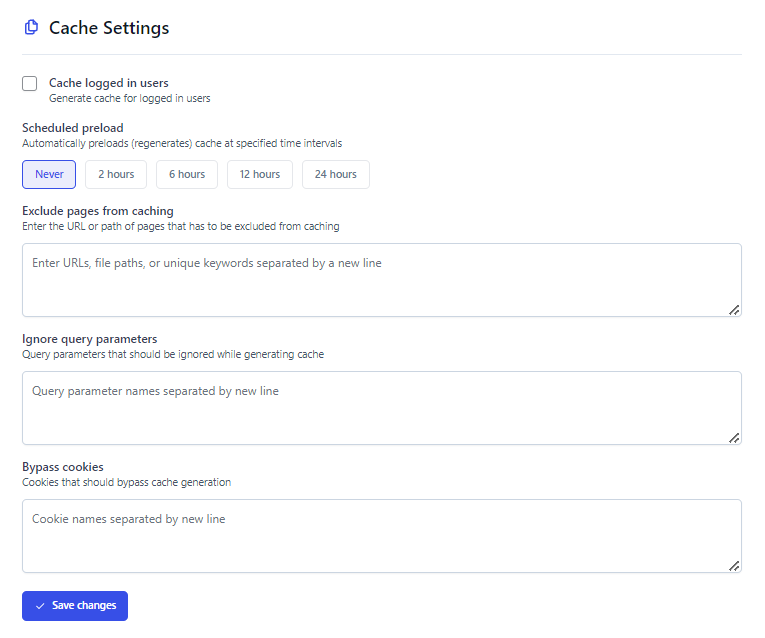
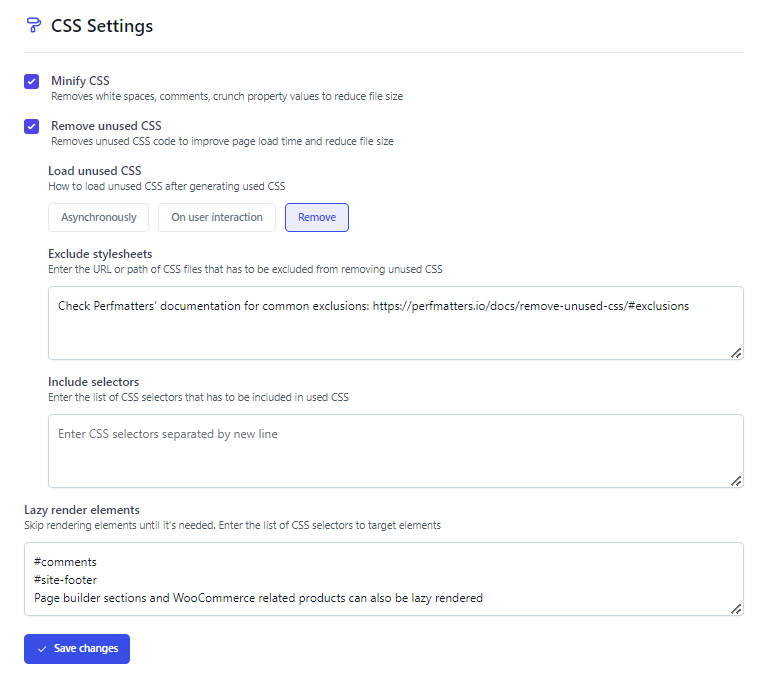


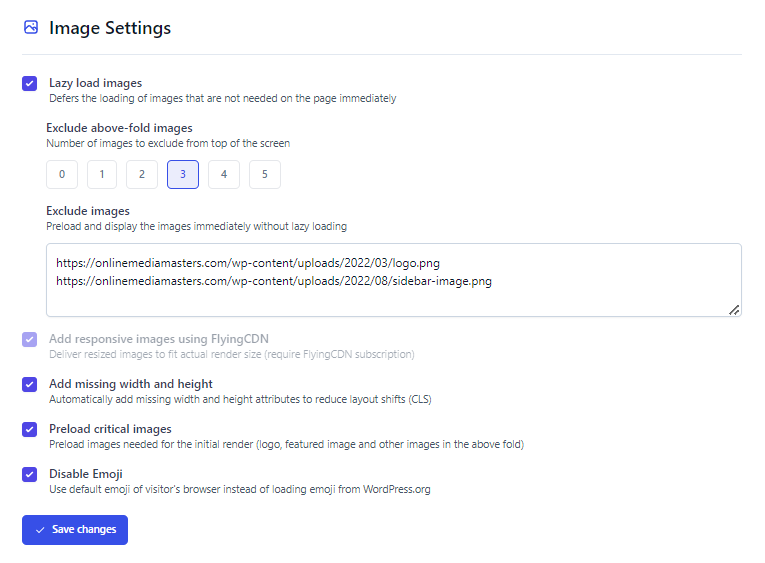




- Load unused CSS – you have 3 options here. Remove unused CSS is the most powerful but will require excluding stylesheets if they break your site. Otherwise, “on user interaction” in the next best setting. FlyingPress’ documentation explains the difference between the 3.
- Lazy render HTML elements – similar to lazy loading images only this can be done with specific areas of your website that load below the fold (comments, footer, Elementor/Divi sections, etc). You’ll want to see this YouTube video from FlyingPress for full instructions.
- Exclude script from defer – if enabling this breaks your website, see common exclusions.
- Delay JavaScript – delay all is most powerful, but you’ll need to see common exclusions. Otherwise, choose “delay selected” then delay these common third-party JavaScript files.
- Preload fonts – after you host fonts locally using the “optimize Google Fonts” setting, view your font files in GTmetrix’s Waterfall chart and preload any fonts that load above the fold. It’s also a good idea to convert your fonts to woff2 which are faster than .ttf, .woff, etc.
- Exclude above the fold images – when you’re asked to set a number, this should be the number of images that usually load above the fold. For me, it’s 3 (my logo, sidebar image, and the first image I use at the top of posts). This can significantly improve your LCP score.
- Disable Block Editor CSS – if you’re not using Gutenberg, enable it. This removes a CSS file that will otherwise load across your site which is needed for Gutenberg to work. But if you use Elementor or another page builder instead, you don’t need it (it just adds bloat).
- Disable WP Cron – when you get to step #11, you can use this setting to disable wp-cron.

If you prefer to use Perfmatters instead of FlyingPres, see these settings to configure it with SiteGround Optimizer. Similarly, you will want to avoid enabling duplicate settings.
2. Configure SiteGround Optimizer
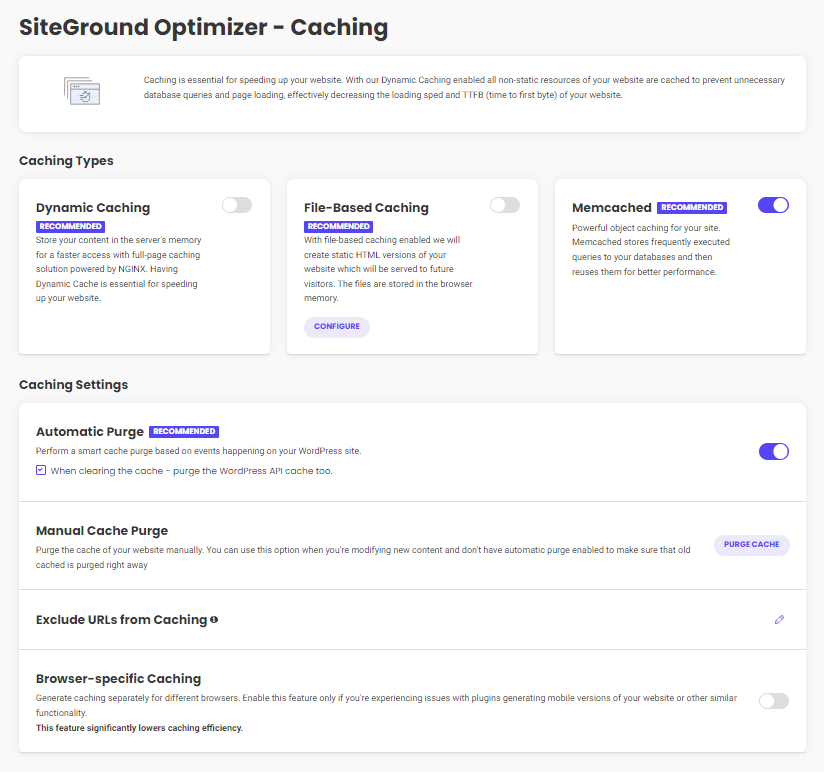
Not that you’re using FlyingPress to address more core web vitals than SiteGround Optimizer would have, you only need SG Optimizer to address a few extra things not found in FlyingPress. Configure the settings normally except the following:- Disable dynamic + file-based caching.
- Disable browser caching.
- Disable Heartbeat control.
- Disable scheduled database maintenance settings.
- Disable all frontend settings.
- Disable lazy loading.
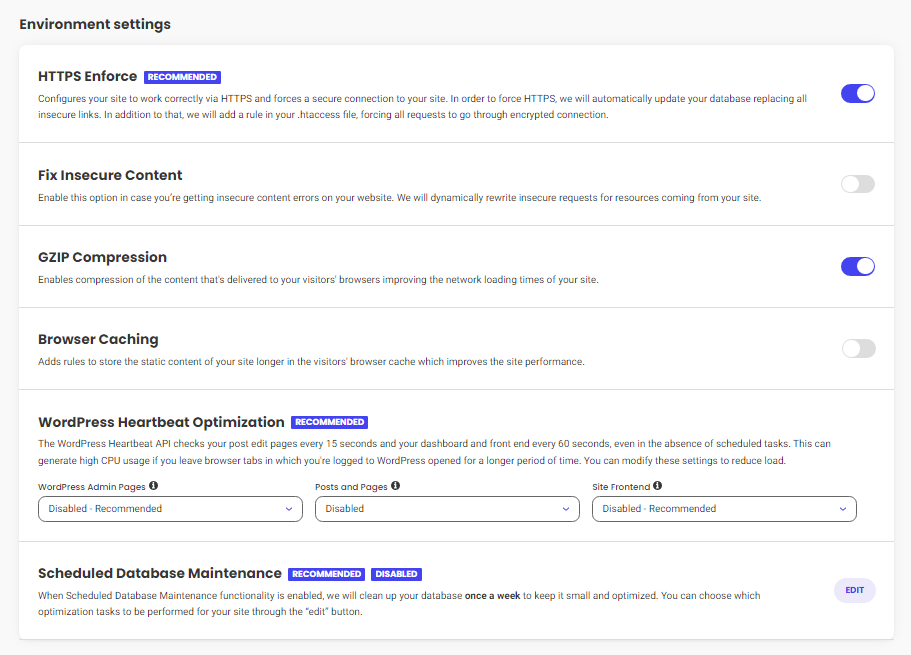
 Environment – HTTPS enforce and GZIP should be on. Browser caching, Heartbeat, and database cleanup are handled by FlyingPress – so leave them disabled in SiteGround Optimizer.
 Frontend Optimization – all settings should be off since FlyingPress handles these.
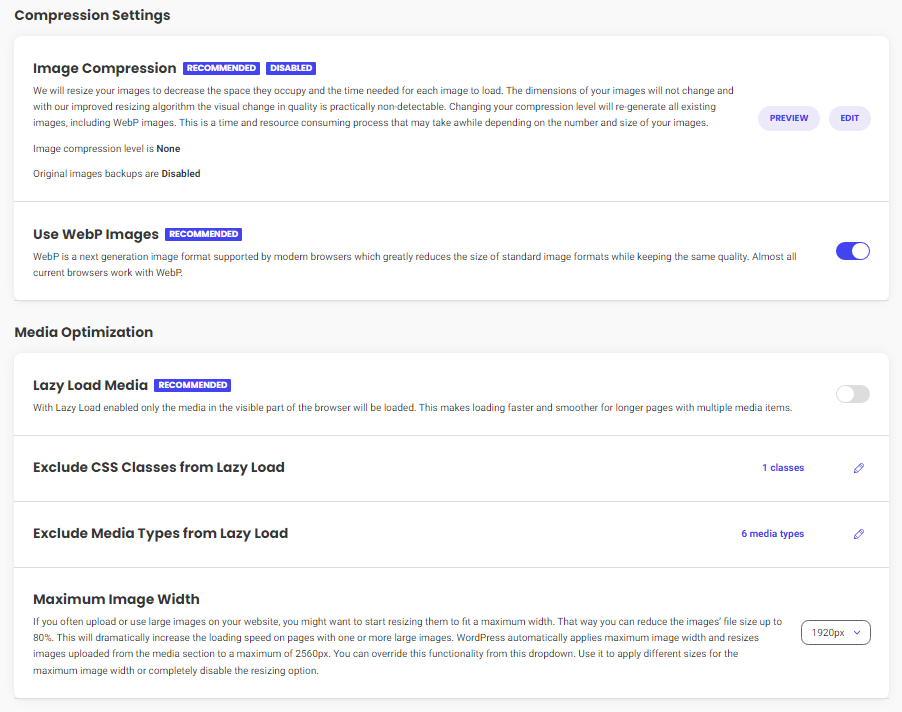
Media – only use this for image compression, WebP, and setting a maximum image width. FlyingPress does a better job with lazy loading, so leave this disabled in SiteGround Optimizer.
Frontend Optimization – all settings should be off since FlyingPress handles these.
Media – only use this for image compression, WebP, and setting a maximum image width. FlyingPress does a better job with lazy loading, so leave this disabled in SiteGround Optimizer.
3. Setup Cloudflare’s APO
Your hosting/CDN are the 2 main TTFB factors – both need to be fast. If you chose a data center close to visitors, you don’t need a CDN. But if you have visitors far away from your SiteGround server, Cloudflare’s APO improves TTFB in multiple locations by caching HTML. Compared to SiteGround’s CDN, Cloudflare has 100+ more PoPs and is $5/mo. FlyingProxy costs $10/mo and uses APO with more Cloudflare features: prioritized routing on more PoPs, firewall, Enterprise-level DDoS protection, and image optimization. It’s faster than just using APO while providing better security, and it was developed by Gijo (from FlyingPress). I don’t recommend SiteGround’s CDN because you have to use their DNS to use it. This was previously blocked by Google and caused 2M SiteGround domains to be deindexed. Getting blocked by Google is not something you want to risk, especially if you do SEO. SiteGround’s CDN also uses Google Cloud which has a smaller network than Cloudflare with less features.| RocketCDN | SiteGround CDN | FlyingCDN | Cloudflare APO | FlyingProxy | |
|---|---|---|---|---|---|
| CDN provider | StackPath | Google Cloud | BunnyCDN | Cloudflare | Cloudflare |
| PoPs | 73 | 176 | 114 | 285 | 285 |
| Tbps speed | 100 | Not listed | 80 | 197 | 197 |
| Dynamic caching | x | ✓ | x | ✓ | ✓ |
| Image compression | x | x | ✓ | x | ✓ |
| WebP | x | x | ✓ | x | ✓ |
| Firewall | x | x | ✓ | x | ✓ |
| Enterprise DDoS protection | x | x | x | x | ✓ |
| Bandwidth | Unknown, but not unlimited as advertised | Unmetered | Unlimited | Unlimited | 100GB |
| Monthly price | $8.99 | $14.99 | $.03/GB | $5 | $10 |
- Change your DNS to Cloudflare [screenshot].
- Proxy traffic through Cloudflare’s CDN [screenshot].
- Purchase APO in Cloudflare (Speed → Optimization → APO).
- Install the Cloudflare plugin.
- Create an API token and add it to the plugin.
- Purge your cache in your cache plugin(s), then Cloudflare.
- Confirm APO is working using uptrends.com.
 Configure Cloudflare Settings
I have a full tutorial on this. It will probably take 10 minutes but is definitely worth it since Cloudflare has a ton of features that can improve both speed/security. If you setup Cloudflare through a third-party service like FlyingProxy, there’s no need to setup Cloudflare’s dashboard.
Test Your TTFB
Once APO is setup, test your site in KeyCDN’s performance test or SpeedVitals which measure TTFB in 10-40 locations. You’ll want to test your site 3 times to make sure caching is working and your CDN uses the closest data center. I use Rocket.net with their free Cloudflare Enterprise who averages a <100ms global TTFB. APO helps but it’s unlikely you’ll get 100ms on SiteGround.
Configure Cloudflare Settings
I have a full tutorial on this. It will probably take 10 minutes but is definitely worth it since Cloudflare has a ton of features that can improve both speed/security. If you setup Cloudflare through a third-party service like FlyingProxy, there’s no need to setup Cloudflare’s dashboard.
Test Your TTFB
Once APO is setup, test your site in KeyCDN’s performance test or SpeedVitals which measure TTFB in 10-40 locations. You’ll want to test your site 3 times to make sure caching is working and your CDN uses the closest data center. I use Rocket.net with their free Cloudflare Enterprise who averages a <100ms global TTFB. APO helps but it’s unlikely you’ll get 100ms on SiteGround.

4. Use Cloudflare’s DNS
You don’t want this to happen to you (you can read people’s angry comments on Twitter).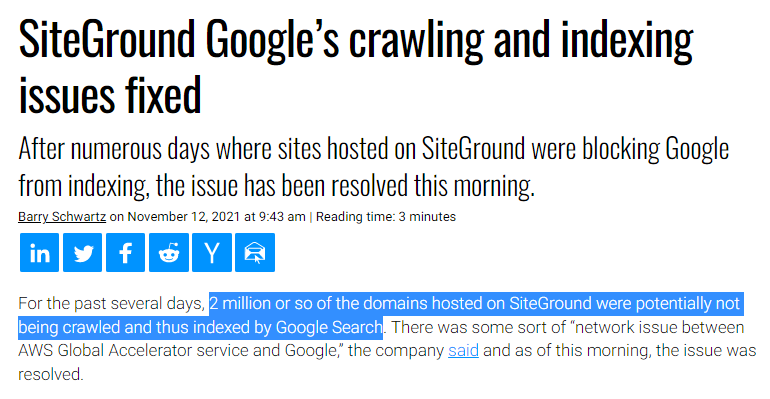 Plus, Cloudflare’s DNS is consistently performant/reliable on dnsperf.com.

5. Resize Images For Mobile
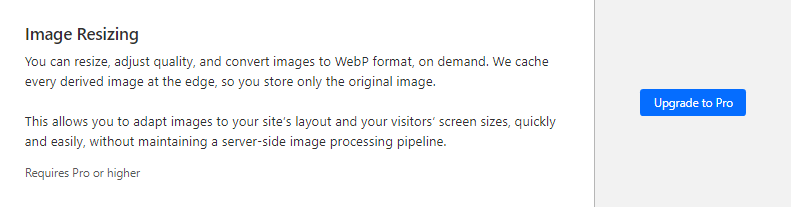
If you have poor mobile/LCP scores, one of the reasons is that most cache plugins/CDNs don’t resize images for mobile. You have 3 main options here:- Use ShortPixel Adaptive Images.
- Purchase Cloudflare Pro for $20/mo which includes image resizing.
- Use FlyingCDN from FlyingPress which includes Bunny Optimizer for image optimization.
6. Disable Plugins On Specific Pages/Posts
Disabling plugins in areas of your site they’re not being used reducing CSS/JavaScript. Contact forms, social sharing, and WooCommerce plugins are known for loading files across your entire website. In the example below, I disabled a social sharing plugin everywhere but posts. You can use the script manager in Perfmatters or Asset CleanUp which is free. They both include a “test mode” in the settings which lets you test this since disabling certain files might break your site. You can enable dependencies in the Perfmatters script manager settings to see plugins using jQuery (known for slowing down websites). Try avoiding jQuery-dependent plugins if possible.

7. Remove Old Plugin Tables With WP-Optimize
Cache plugins also don’t remove tables left behind by old plugins you deleted. Install WP-Optimize and go through your tables. If you see “remove,” it means you installed an old plugin, deleted it, and it left behind tables. Remove it if you don’t plan on using that plugin again. You may also notice certain plugins add lots of database overhead. I noticed Rank Math’s Analytics were, so I disabled that module and get my analytics directly from GA/Search Console. You can use FlyingPress or SiteGround Optimizer for regular database cleanups, but if you find yourself deleting plugins frequently, use WP-Optimize to clean their tables from your database.
8. Configure SiteGround Security
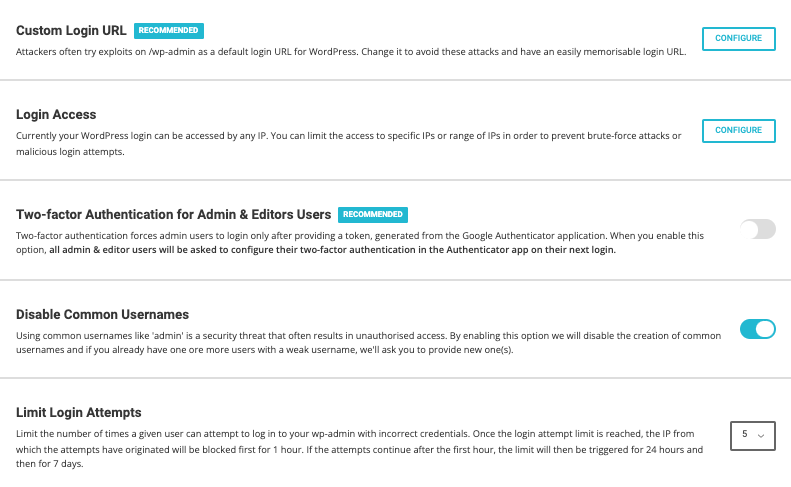
Blocking unwanted requests lightens the load on the server too (this is also why using a firewall like Cloudflare’s WAF is so important). SiteGround’s security plugin can disable XML-RPC, move your wp-login page, limit login attempts, and has several other security features. It has solid reviews and is simple to set up. Just make sure to specify a custom login URL and use two-factor authentication in the settings.
9. Choose The Closest SiteGround Data Center
When you buy any hosting plan, choose the data center closest to visitors. When visitors are far away from the data center, use a CDN with full page caching and ideally take advantage of other CDN features like Argo Smart Routing + load balancing. These reduce TTFB when visitors are far away (with the right CDN, using a close data center barely matters).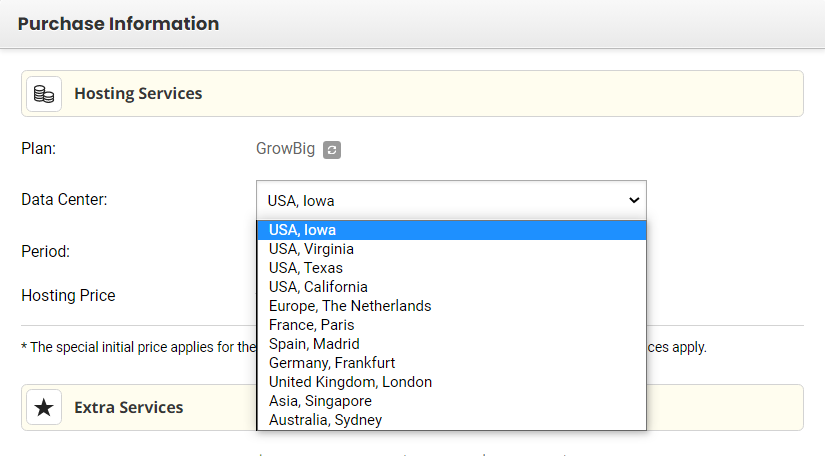
10. Optimize Your Page Builder
I have separate tutorials for speeding up Elementor and Divi. Check your coverage report in Chrome Dev Tools to see how much CSS/JavaScript they’re adding to your site. This can usually be reduced by using their built-in performance settings, disabling unused fonts/font icons, and disabling Gutenberg’s wp-block-library (in FlyingPress). I recommend viewing Perfmatters’ documentation on common exclusions for Elementor (or Divi) which you can apply to FlyingPress. However, I also recommend looking into something like GeneratePress (what I use) which is lightweight and doesn’t add nearly as much CSS + JS. Especially when you start adding more Elementor plugins, your site gets bloated very quickly.
11. Upgrade To PHP 8+
Login to Site Tools → Devs → PHP Manager, then upgrade to at least PHP 8. Even though SiteGround says their Ultrafast PHP can improve TTFB by up to 50%, it’s a bold claim and you probably won’t get anywhere near that type of result. Regardless, it’s always a good idea to keep your PHP version updated as long as your theme and plugins are compatible.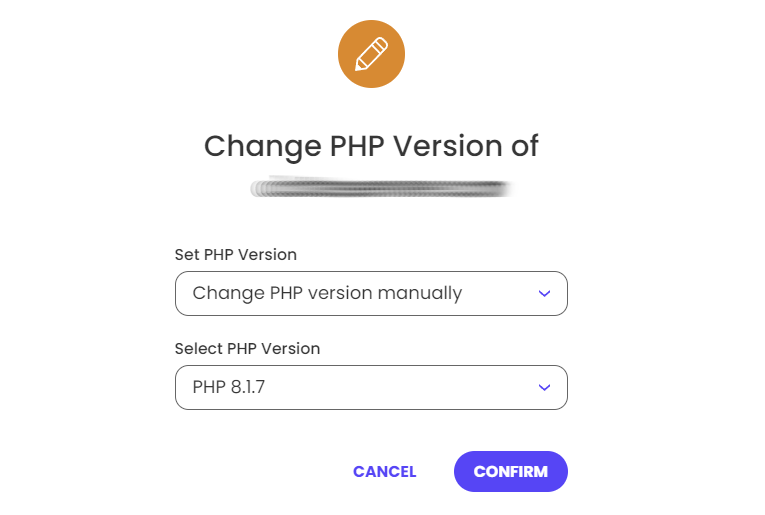
12. Replace WP-Cron With A Real Cron Job
SiteGround has a tutorial, but it’s easy. The first step is to disable wp-cron which you can do in FlyingPress. You can also do this this manually by opening your wp-config.php file and disable WordPress cron by adding the code before the line: /* That’s all, stop editing! Happy blogging. */define('DISABLE_WP_CRON', true);cd /home/customer/www/yourdomain.com/public_html; wp cron event run --due-now >/dev/null 2>&1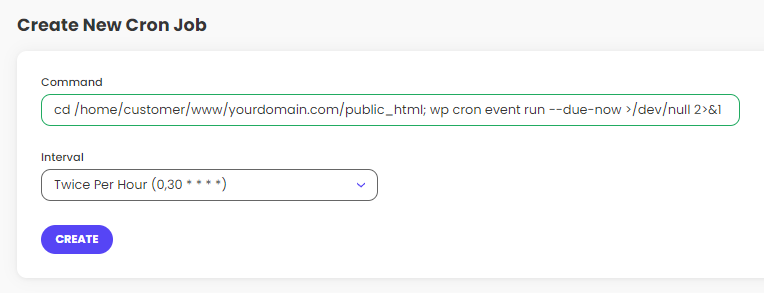
13. Don’t Upgrade To SiteGround’s Cloud Hosting
I’ve already used it and am glad I don’t anymore. Many people upgrade from GoGeek to SiteGround’s cloud hosting in hopes of a faster website or to fix CPU limit issues. Don’t do it. Like many people reported, it doesn’t always fix CPU issues even though it starts at $100/mo. Big waste of money considering it’s not very fast and still uses slow technology like SATA SSDs.

14. Stop Using SiteGround
Here are my top 10 reasons:
- Slow hardware/software – SiteGround is shared hosting (cloud is faster) on Apache servers (LiteSpeed is faster) with SATA SSDs (NVMe storage is 6-7x faster), Memcached (Redis is faster), and MySQL (MariaDB is faster). It’s a big reason why SiteGround is slower than even many shared hosts and is notorious for CPU limits.
- History of TTFB issues – in 2019, Backlinko found SiteGround had the slowest TTFB of any host tested. Today, SiteGround says they use Google Cloud’s N2 machine family which isn’t optimized for performance (it’s “balanced” instead). When you search Facebook groups that aren’t controlled by SG (like WP Speed Matters), you can find many complaints about their slow TTFB and poor ethics.
- CPU limits – SiteGround’s servers are sensitive to CPU limits which constantly force you to upgrade. I went from GrowBig to their $120+/mo cloud hosting plan just to fix it. Like many people, I ended up leaving and never had CPU issues again.
- Expensive renewals – after 1 year, you’re paying $25/mo for their GrowBig plan. Then you add $14.99/mo for their CDN and it’s $40/mo for shared hosting. Ripoff.
- Things get messy – just like you saw in this tutorial, you have to configure 2 cache plugins. And even with Cloudflare’s APO, this still doesn’t resize images for mobile.
- Replace products with their own inferior products – they’ve already replaced their own (previously fast) servers with Google Cloud’s slow N1 machine family, cPanel with Site Tools, Cloudflare with their own CDN, and SiteGround Optimizer has performance + compatibility issues. Then they claim their products are better.
- Lack of accountability – just like you saw when their DNS got blocked or in SG Optimizer’s support threads, they blame other companies, themes, or plugins for their mistakes. They lie about how their CDN is essentially the same as Cloudflare. They also blame CPU limits on bots, Heartbeat, etc. Don’t trust anything they say.
- Fake reviews – SiteGround hires Facebook admins to post reviews pretending to be “real” customers. The same admins remove negative SiteGround comments, serve as SiteGround’s support agents, and constantly like SiteGround-supporting comments. These groups constantly favor SiteGround because it’s a fake illusion.
- Legally threatens people who write bad reviews – read this Reddit thread. SiteGround also sent me a cease and desist letter after I changed my review of them. They do this because their TOS includes an NDA they use to demand you take down any mentions of “SiteGround” from your website. If they don’t like your review, expect a letter. This is why you don’t see bad SiteGround reviews but mine.


15. Use Faster LiteSpeed/Cloud Hosting
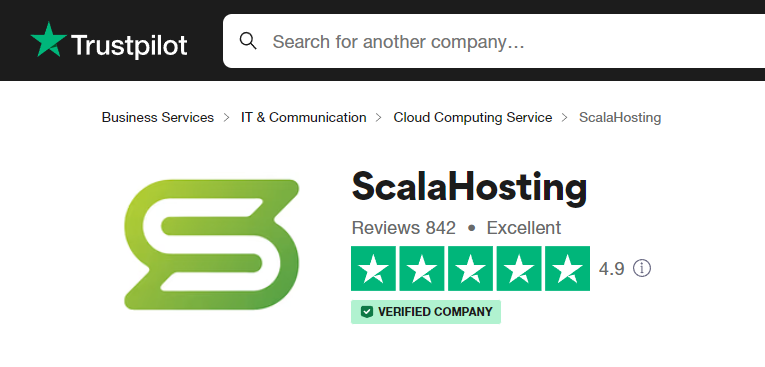
ChemiCloud – faster LiteSpeed hosting, faster NVMe storage, and a perfect 5/5 star TrustPilot rating with several reviews of people who either moved or were about to purchase SiteGround. No need to buy a premium cache plugin since you’ll use the free LiteSpeed Cache which does a better job with web vitals. QUIC.cloud’s CDN is also faster (and often cheaper) than SiteGround which you can configure using my tutorial. And you’re much less likely to have to upgrade from CPU limits since LiteSpeed is more efficient and they don’t have strict limits. It’s cheaper, faster, and scalable since you can add CPU cores/RAM using their Turbo+ Boost add-on if traffic grows. NameHero is very similar but they cost more and only use NVMe storage in their US data center. Hostinger/GreekGeeks have many scam reports if you look at their TrustPilot reviews or Reddit.


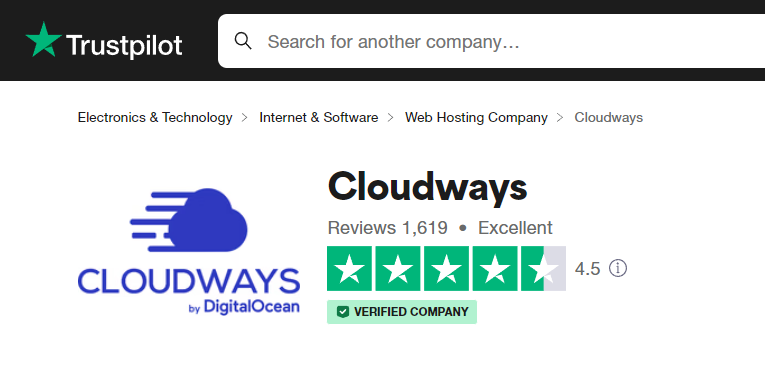
 Cloudways – similar to Rocket.net between cloud hosting, NVMe, MariaDB, Cloudflare Enterprise, and they use Redis Object Cache Pro. However, their Cloudflare Enterprise costs $5/mo and doesn’t have APO, they use PHP-FPM instead of LiteSpeed’s faster PHP, support is worse, and they were acquired by DigitalOcean who raised prices. Still faster than SiteGround (including SG’s cloud hosting) and I was using the Vultr High Frequency plan before Rocket.net.









Why is my website slow on SiteGround?
SiteGround is slow because their cache plugin does a poor job with core web vitals and their hosting runs on inferior hardware + software. This can also lead to high CPU usage.
Why is SiteGround’s TTFB slow?
SiteGround uses a balanced Google Cloud machine family (N2) which is slower than compute-optimized families (like C2). It’s also shared hosting with limited resources.


